Why architecture exploration?
Most interesting digital designs are configurable: a data width here, a memory depth there, an optional multiplier, a pipeline depth. Each choice changes area, timing and power — and the best combination depends on your target technology and your application constraints.
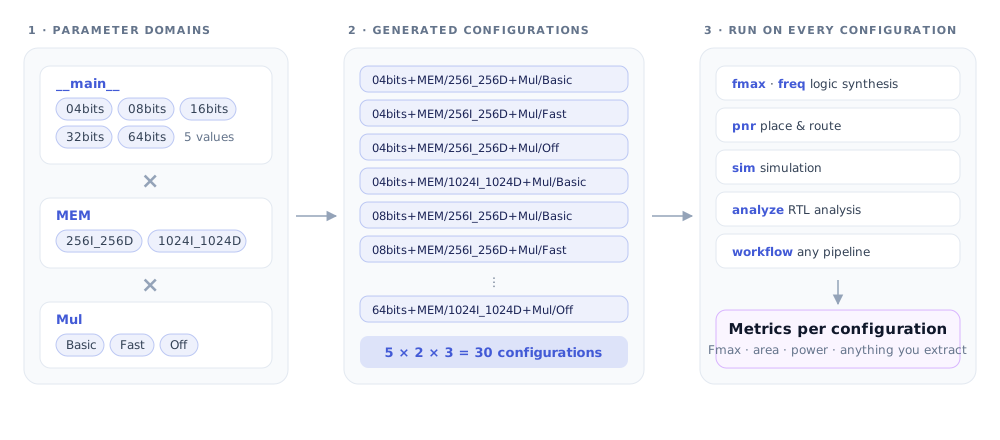
Exploring that space by hand means editing sources, launching a tool, writing down a number, and repeating dozens or hundreds of times. Architecture exploration removes that toil: you describe the parameters, and Odatix produces and implements every configuration.
It is the foundation the rest of Odatix stands on. Synthesis, simulation, analysis and workflows all run per configuration — so whatever you set up here is swept by every other feature for free.
When you need it
- Sizing a design. You want the area and Fmax of your ALU at 4, 8, 16, 32 and 64 bits, on two FPGAs, without maintaining five copies of the source.
- Choosing between implementations. A fast multiplier, a basic one, or none at all — three variants of one parameter, compared on equal footing.
- Sweeping a large, structured space. A RISC-V core with independent choices for instruction memory, data memory, ISA extensions and multiplier: dozens of combinations you never want to write out by hand.
- Publishing a comparison. A paper or a report that needs the same design measured consistently across a parameter range.
- Non-HDL sweeps. The same mechanism drives workflows, so a script, a compiler flag or a training hyper-parameter sweeps identically.
Working with the rest of Odatix
| Combine it with | Why |
|---|---|
| RTL analysis | Elaborate every generated configuration in seconds, before spending hours synthesizing a space with a typo in it. |
| Fmax synthesis | Each configuration reaches its own maximum frequency — the only fair way to compare variants. |
| Custom-frequency synthesis | Compare the same configurations at a common clock, for area and power studies. |
| Simulation | Confirm every configuration still passes its testbench, not just the one you developed on. |
| Workflows | Reuse the same domains and generation rules on anything that runs from a shell. |
| Explorer | Every parameter domain becomes an axis you can plot metrics against. |
Where to go next
- Tutorial — Implement your own RTL: a design, its configurations and a first run, end to end.
- Reference — Architecture settings · Run settings files
- Guides — Parameter domains · Configuration generation · Virtual parameter domains
- Next feature — RTL analysis, the cheap check to run before implementing a whole space.